Instructors want to trust the work students hand in. Students want credit for the work they actually did. As AI use in the classroom becomes routine, both are getting harder, and that’s exactly where writing transparency earns its place.
Grammarly Authorship was built to close that gap.
Since Grammarly Authorship launched in beta in Google Docs in October 2024, it has expanded to Grammarly Docs, Microsoft Word, and Word Online, so students can show their writing process wherever they write. It now recognizes AI-generated content both pasted in and generated from within a document, including Copilot in Word and Gemini in Google Docs.
Students have generated more than 5 million Authorship reports to date.
The results show up on campus. After introducing Authorship across its English department, Rowan-Cabarrus Community College reduced academic integrity violations from 27 to 1, a 96% drop, in a single semester.
Authorship delivers value on its own. It goes further when it’s built into the systems an institution already runs. After integrating with Canvas LMS in September 2025, Grammarly Authorship now integrates with Blackboard, giving institutions a scalable way to make student writing transparent while students keep writing in the tools they prefer to use.
What is Grammarly Authorship?
Grammarly Authorship automatically categorizes the sources of text in a document, whether it’s in Google Docs, Microsoft Word, Word Online, or Grammarly Docs. It gives quick signals and detailed reports showing where writing came from: human-typed, AI-generated, copied, or rephrased with Grammarly’s generative AI.
Unlike traditional detection tools, Authorship is built on transparency and attribution, with student consent. Students can show their authentic writing process, and instructors can spend their time guiding rather than second-guessing it with unclear data.
Authorship’s new Blackboard integration
Instructors can require Authorship reports directly within Blackboard assignments. Here’s how it works:
1. Instructor setup
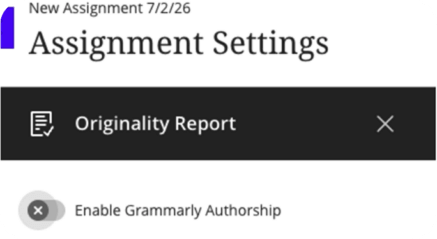
While creating an assignment, instructors simply switch on the new Enable Grammarly Authorship option in the Originality Report section of their Blackboard assignment settings.
2. Students keep writing where they always do
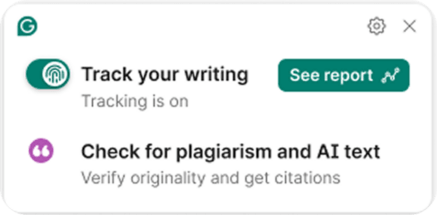
In the tools they already use (Microsoft Word, Word Online, Google Docs, or Grammarly Docs), students can turn on Authorship tracking with a single click and view their Authorship report at any time. It attributes their text sources automatically when they use a gen AI tool or paste from a third-party source. Because Authorship is student-first, students can see their own writing process data but can’t alter it before sharing, which builds two-way visibility into how the work was made.
3. Sharing to Blackboard is easy with a share link
When they’re ready to submit, students select Anyone with the link in their Authorship report access settings.
4. Quick attachment through normal submission workflow
Students attach the Authorship report to their normal Blackboard submission by submitting their report’s share link alongside their assignment document.
5. Instructor insights at scale
Instructors gain a class-level view of the Authorship report and can open any individual student’s full writing process replay when they want to dig in. That makes it easy to focus on outliers while trusting that every submission includes transparent attribution.
Why this matters
Educators want writing to be something students genuinely work through, and institutions need a way to trust in that work as AI use becomes routine. Students want that too: Many are actively looking for ways to use AI they can stand behind.
Here’s what the Blackboard integration gives each group:
- Students get a low-effort way to show their writing process and get credit for their own thinking, whether or not they used AI, plus protection from false accusations. Over time, attributing their sources builds the AI-literacy habits that matter well beyond any single assignment.
- Instructors get assignment-level control with the ability to require students to submit an Authorship report with their assignment. Authorship is visible in Blackboard through a single class view, meaning instructors don’t have to open reports one by one. It also allows them to drill into any student’s process when a conversation is warranted. That gives back hours during grading and turns integrity checks into teaching moments rather than investigations.
- Institutions get a consistent, scalable way to maintain academic trust across departments, built on tools faculty and students already use, so adoption doesn’t hinge on changing anyone’s habits, plus a defensible answer when leadership asks how AI is being handled.
The Blackboard Authorship integration is now available for Grammarly for Education customers on any institution-wide plan that uses Blackboard. Administrators can install the LTI in a few steps using the setup guide.
We’re glad to partner with Anthology and our school and university customers to make writing transparency a reality for the AI era.
To learn more or get started, visit Grammarly for Education.