Key takeaways
- The best AI detector depends on your use case, since teachers, students, professionals, and publishers each need different levels of detail, language support, and free access.
- To choose an AI detector, compare how it scores AI-generated, human-written, and mixed text, how easy its results are to read, and what features it includes.
- AI detection scores show the probability that text was AI-generated, so a score above 60% might suggest heavy AI involvement, and a score below 20% suggests little to none.
- Grammarly is our top pick for students and professionals, with correct scores on all five of our test samples and a #1 quality ranking from the independent RAID benchmark.
- Avoid treating any AI detector’s score as final proof, as four of the six tools we tested misread human-written or mixed text.
More people are turning to AI to generate written content, yet it’s becoming increasingly difficult to identify it. That’s why finding the right AI detection tool matters, but choosing the best one depends on your use case. For instance, teachers need a tool to verify that students are properly using AI to augment, not replace, their thinking when completing schoolwork. On the other hand, professionals and businesses might use the tool to ensure that all published content meets their internal quality bar.
We tested six tools under identical conditions to help students, teachers, professionals, and businesses find the best AI detector for their needs. Let’s take a closer look at what we found.
Table of contents
- How we tested and reviewed AI detectors
- Comparison table of the best AI detectors
- Our picks for the top AI detectors of 2026
- Our verdict: the best AI detector
- Best AI detector FAQs
How we tested and reviewed AI detectors
We tested each tool under the same conditions across three scenarios: AI-generated content, human-written passages, and a mix of AI- and human-generated content (all samples were roughly 130 words). For AI-generated texts, we tested texts generated from three models: Claude Sonnet 5.0 (Medium Effort), ChatGPT 5.6 Sol, and Grammarly (which has an AI generation feature). All tools were evaluated on the free tier, since that’s what most users will encounter, though we also factored in the paid tier for our overall analysis.
Note that we only tested on a small sample of text; therefore, the results are signals, not a verdict on a tool’s accuracy or quality.
How to read AI detection scores
AI detection scores are usually represented as the probability that a given text was generated by AI, not a percentage of AI usage. Instead of looking at the exact number, it’s helpful to look at it as part of a range; that’s why some tools might show you the final interpretation of the score rather than the raw number itself. A helpful rule of thumb is that anything above 60% suggests that AI was heavily involved, whereas anything below 20% indicates a low likelihood of AI usage.
It’s also important to note that false positives — when the tool flags your content for AI when it’s not — are relatively common. This can happen if your writing sounds formulaic or overly professional. That’s why it’s key to complement the score with a human review to make a final call.
Comparison table of the best AI detectors
| Tool | Best for | Our test results | Standout features | Free access | Pricing (per month) | Sign-up required? |
| Grammarly | Students & professionals | 5/5 correct | Rewrites that can lower AI score, authorship tracking, plagiarism check, and multi-language support | 1 scan, 1,400 chars | $30 | For 2nd scan |
| GPTZero | Educators & institutions | 5/5 correct | Detects how AI was used, hallucination detector, and plagiarism check | 10,000 words/mo | $23.99 for Premium, $45.99 for Professional | For scans over 10,000 chars |
| Copyleaks | Non-English content teams | 4/5 (missed the mixed sample) | AI source match, sensitivity controls, and multi-language support | 1 scan of 25,000 chars | $13.99 for Personal and $74.99 for Pro | No |
| QuillBot | Writers & students | 4/5 (flagged human text as AI) | AI humanizer, paraphraser, and explanation cards | 6 scans/day, 1,200 words | $19.95 | Yes (for trial) |
| Originality.ai | Content teams & publishers | 3/5 (flagged human and mixed text as AI) | 3 detection models, multi-language support, and fact-checker | 3 scans/day, 12,000 chars | $14.95 for Premium, $179/month for Professional | No |
| Winston AI | Publications & teachers | 3/5 (missed human and mixed samples) | Image analysis, multi-language support, sentence-level analysis, and paraphrasing suggestions | 2,000 words (14-day trial) | $18 for Essential, $29 for Advanced, and $49/month for Elite. | Yes (for trial) |
Our picks for the top AI detectors of 2026
1. Grammarly: Best AI detector for students and professionals
Best for: Students and working professionals, especially those working on high-stakes writing, who want an AI detector connected with full writing support.
Our testing results:
- AI-generated samples: Accurately scored all as 100% AI.
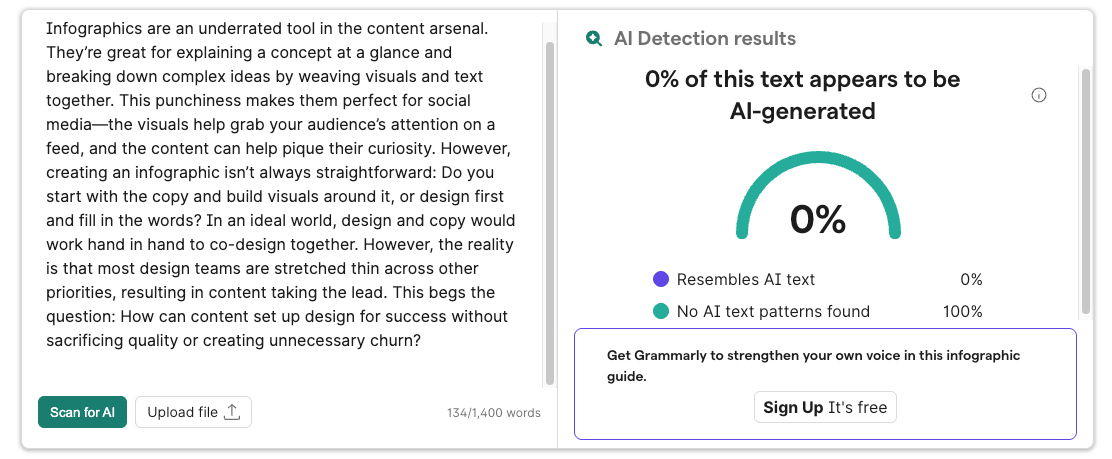
- Human sample: Accurately scored as human (0% AI).
- Mixed sample: Accurately scored as mixed (44% AI).
Strengths:
- Independently verified by RAID (Robust AI Detection) as the #1 tool in quality (99% accuracy) across 670,000 texts.
- Easy-to-interpret results, returning a single percentage score.
- Robust paid tier (Grammarly Pro) integrates detection with inline rewrite suggestions drawn from Grammarly’s own dataset, meaning edits can lower your AI score, not just rephrase it, alongside plagiarism checking and authorship tracking.
- Works across browsers and platforms (including desktop and mobile), along with apps like Google Docs and Microsoft Word.
- Includes free access to additional tools to help improve writing, such as a plagiarism checker, grammar checker, sentence paraphraser, and more.
- Supports multiple languages (including Spanish, French, German, Italian, and Portuguese).
Limitations:
- Limited free version, with only 1 scan, no sentence-level breakdown, and no rewrite features.
- Need to sign up to run another scan.
Free access: Supports 1 scan of up to 1,400 characters with no account required to access. You can try Grammarly’s free AI detector here.
Full experience: Grammarly Pro ($30/month or $144/year) adds unlimited scans and advanced writing support (including grammar and clarity suggestions, rewrite suggestions, and a growing list of specialized writing agents).
Grammarly’s AI detector is one part of a larger authenticity suite. With a Grammarly account, you can:
- Show your process with Authorship, which tracks what you typed, pasted, or wrote with AI in Google Docs and Microsoft Word, then creates a shareable report.
- Check for plagiarism against billions of web pages with the plagiarism checker.
- Cite your sources in APA, MLA, or Chicago style with the citation generator.
2. GPTZero: Best AI detector for educators
Best for: Educators and institutions who need a nuanced breakdown of how AI was used in the writing process.
Our testing results:
- AI-generated samples: Accurately scored all as 100% AI.
- Human sample: Accurately scored as 100% human.
- Mixed sample: Accurately scored as 0% mixed, with additional clarification that it’s human-written and AI-polished.
Strengths:
- The most nuanced tool tested — rather than just detecting AI in text, also identifies how AI was used as a generator, polish, or paraphrasing tool.
- Generous free tier, with up to 10,000 words per month.
- Premium plan adds multilingual detection (including Spanish, French, German, and Portuguese).
- Sentence-level detection that highlights which sentences read as AI (Premium).
- Chrome extension with built-in chat for checking text in Google Docs and across the web.
- Wide toolset for students and educators, including Writing Replay, a hallucination detector, and expert feedback.
Limitations:
- Results are hard to interpret at a glance — the tool outputs a final verdict along with a percentage likelihood across multiple scenarios.
- Free tool is cumbersome to use, requiring multiple clicks and pop-ups before reaching results.
Free access: Scan up to 10,000 characters at a time with no account, or up to 10,000 words per month with a free account. Results show a final verdict and scenario breakdown only — sentence-level detail is paywalled. Try GPTZero’s free AI detector here.
Full experience: The paid tier includes advanced detection features (e.g., plagiarism checker, hallucination detector). There are two paid tiers: Premium ($23.99/month or $155.88/year for 300,000 words) and Professional ($45.99/month or $299.88/year for 500,000 words).
Disclosure: GPTZero is part of Superhuman, Grammarly’s parent company.
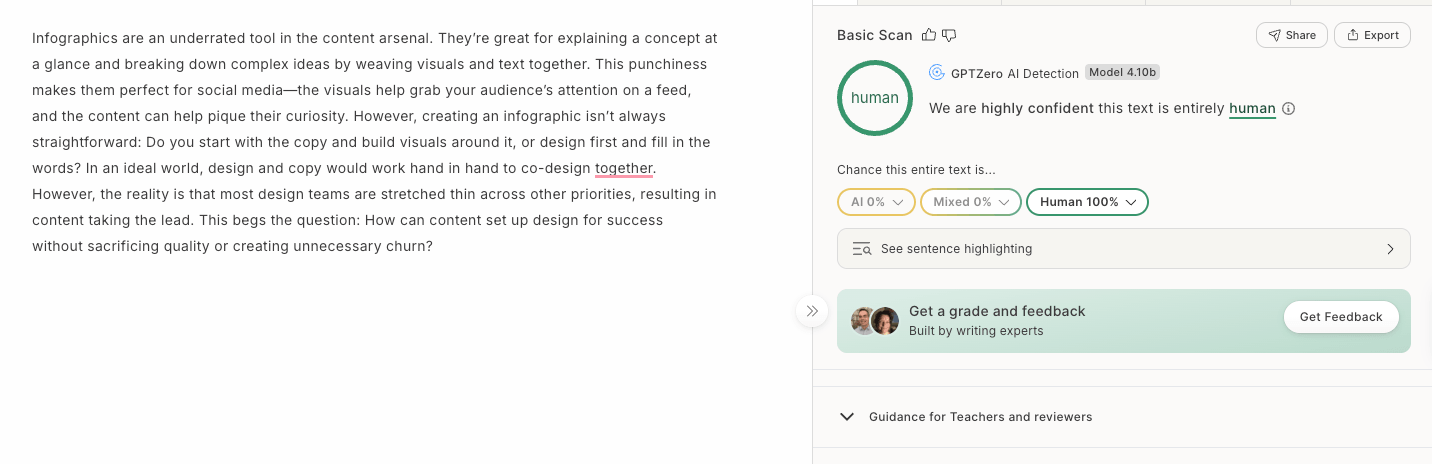
3. Copyleaks: Best AI detector for non-English content
Best for: Content teams working with non-English content.
Our testing results:
- AI-generated samples: Accurately scored all as 100% AI.
- Human sample: Accurately scored as human (0% AI).
- Mixed sample: Incorrectly flagged as human (claimed that it was 0% AI).
Strengths:
- Generous free tier character limit — scan a text with up to 25,000 characters without creating an account.
- Supports analyzing content in 100+ languages, including Arabic, Chinese, Japanese, and Greek.
- Paid features give teams more control and context, such as AI source match (which identifies whether text matches other AI-generated content on the web) and the ability to adjust the model’s sensitivity level.
Limitations:
- Struggled with accuracy on the mixed sample in our testing.
- Free experience is functional but limited — most features beyond the overall score are paywalled, and users need to refresh the page or create an account to run another scan.
Free access: Users can run a free scan of up to 25,000 characters per month without creating an account. After signing up for a free account, they can analyze an additional 1000 words per month.
Full experience: In addition to more scans, users unlock AI source match and AI phrases. There are two tiers: Personal ($13.99/month or $167.88/year for 300,000 words) and Pro ($99.99/month or $899.88/year for 3 million words).
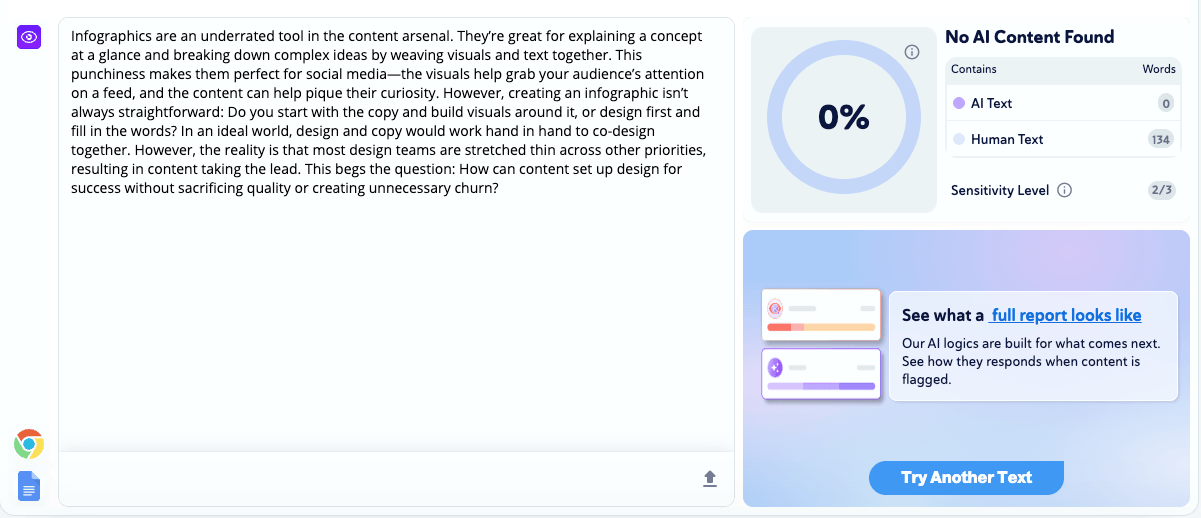
4. QuillBot: Best AI detector for quick checks
Best for: Writers and students who want a quick pulse check about the use of AI in their writing.
Our testing results:
- AI-generated samples: Accurately scored all as 100% AI.
- Human sample: Inaccurately flagged as AI (claimed it was 100% AI).
- Mixed sample: Accurately flagged as mixed (63% AI).
Strengths:
- Get advanced features for free — results include a final score, color-coded AI vs. human text breakdown, and an explanation card flagging why the writing triggered detection
- No pop-ups when running multiple scans.
- Supports non-English text, including Russian, Hindi, Spanish, and Chinese.
- Detection is part of a broader writing suite with Citation Generator, AI humanizer, Paraphraser, and Plagiarism Checker.
- Works across browsers and desktop, including Google Docs and Microsoft Word.
Limitations:
- Struggled with the accuracy of human-generated writing in the human sample.
- Need to create an account to use free AI detection features
- Some free features (like rewrites and citation generator) are glitchy and difficult to use in the browser.
Free access: 6 scans of up to 1,200 words per day with 1 free rewrite card explaining necessary changes. Users can also use Grammar Checker, AI Humanizer, and Plagiarism Checker for free with no account required.
Full experience: Premium offers unlimited detection scans, rewrite cards, and access to the full suite of QuillBot tools for $99.95 per year or $19.95 per month.
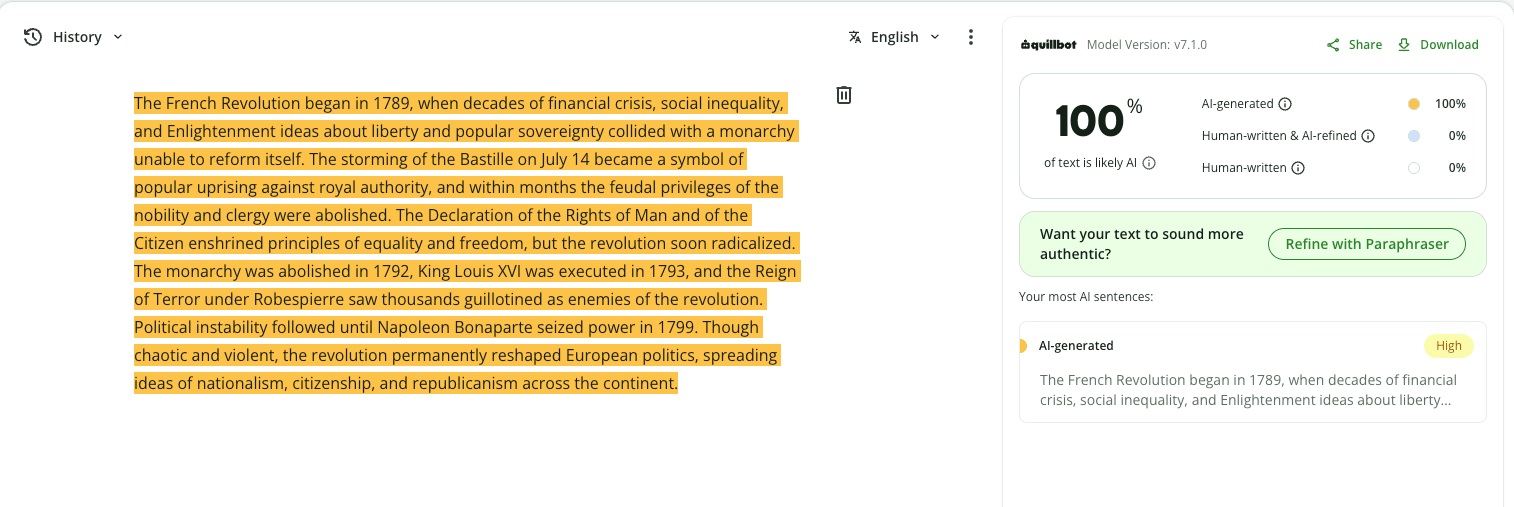
5. Originality.ai: Best AI detector for content teams at scale
Best for: Content managers, publishers, or SEO teams verifying content at scale.
Our testing results:
- AI-generated samples: Accurately scored all as 100% AI.
- Human sample: Inaccurately flagged as AI (claimed it was 100% AI).
- Mixed sample: Inaccurately flagged as AI (claimed it was 100% AI).
Strengths:
- Offers three detection models to customize results: one lenient toward AI-edited text, one with zero tolerance for AI-edited and AI-generated content, and one for analyzing non-English text (the latter two are available only in the paid tier).
- Can enter new text to run a new scan (no page refresh needed).
- Shows a color-coded breakdown between human-generated and AI text.
- Offers complementary tools like a fact-checker, a content SEO optimizer, and a plagiarism checker, all usable in the browser without an account.
Limitations:
- Struggled with the accuracy of human-generated writing in both human and mixed samples.
- Free experience requires users to click through pop-ups before reaching results, which can slow them down.
Free access: 3 scans of up to 12,000 characters per day, and limited to the basic detection model, with no account required.
Full experience: The paid offering unlocks all three detection models (including multi-language support), Deep Scan (with details on why a user’s writing was flagged as AI and how to fix it), and credits to analyze more texts. There are two paid tiers: Premium ($14.95/month or $155.40/year for 300,000 words) and Professional ($179/month or $1,638.96/year for 500,000 words)
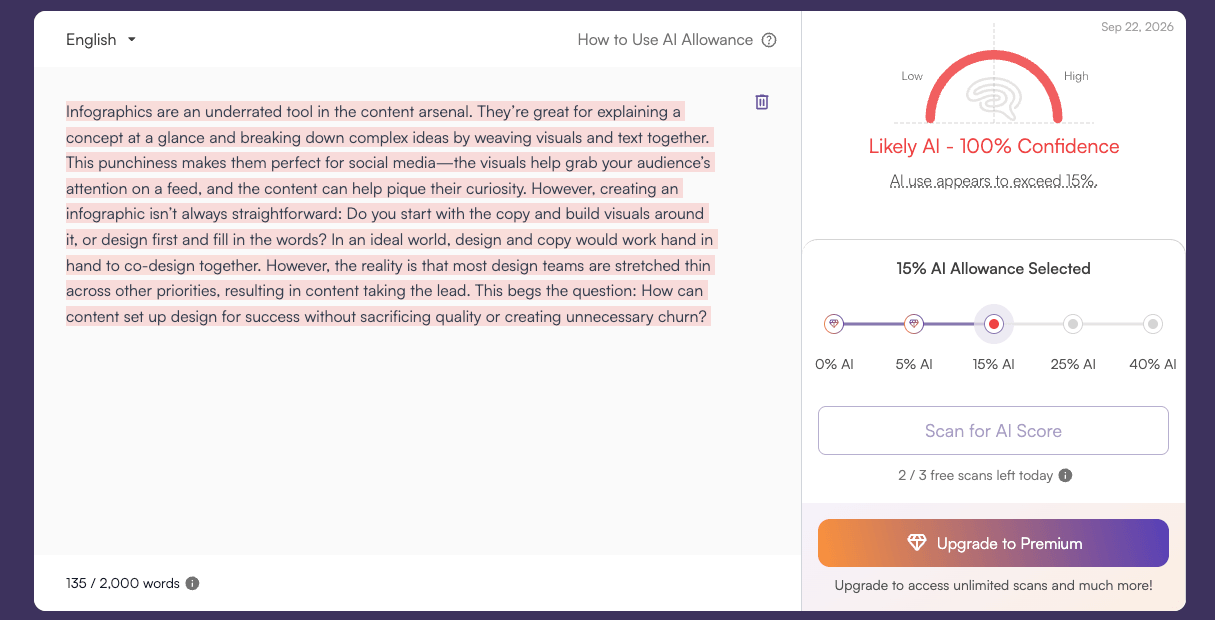
6. Winston AI: Best AI detector for published content
Best for: Publications and teachers who prioritize ease of use.
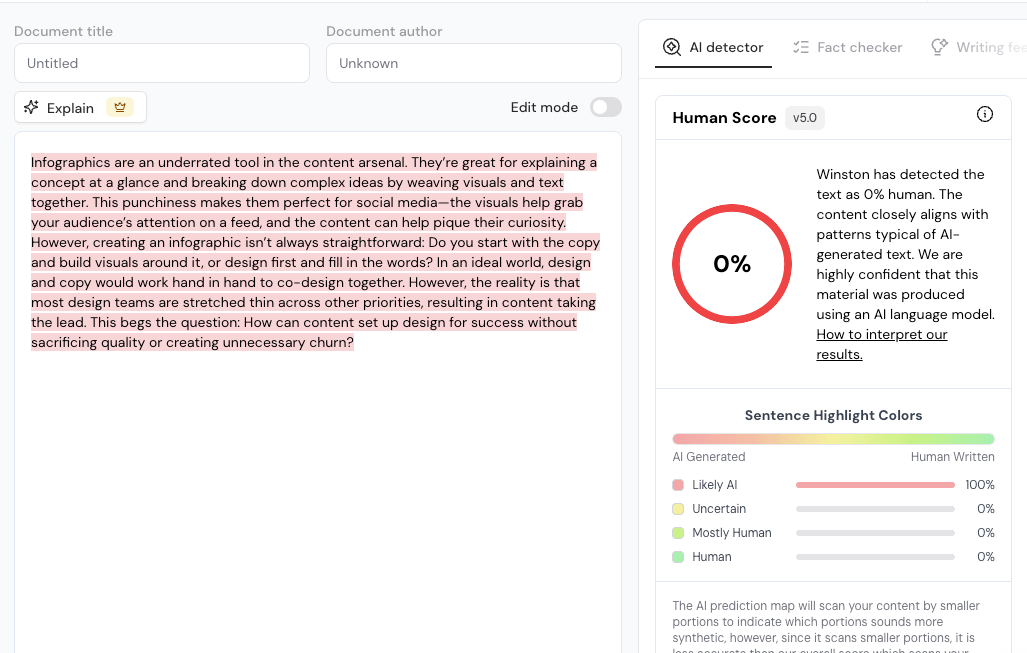
Our testing results:
- AI-generated samples: Accurately scored all as 100% AI.
- Human sample: Inaccurately flagged as AI (claimed it was 0% human).
- Mixed sample: Inaccurately flagged as AI (claimed it was 0% human).
Strengths:
- One of the easier tools to interpret — results are framed as the likelihood a piece was written by a human, which is more intuitive than a raw AI percentage.
- Color-coded results allow you to see at a glance which sentences read as AI versus human-coded.
- Easy to check published content by uploading a file or importing from a URL.
- Offers multilingual support and image analysis for AI detection.
Limitations:
- Struggled with accuracy in our testing, failing to correctly score the human and mixed samples.
- Need to create an account to access free tier.
- Limited free tier — it lacks sentence-level detail or additional context without upgrading.
- Running multiple free scans requires a page refresh.
Free access: Scan 2,000 words with a 14-day free trial.
Full experience: The paid tier includes additional credits for further scanning, along with advanced features such as shareable reports, a plagiarism checker, sentence-level feedback, and paraphrasing suggestions. They offer three tiers: Essential ($18/month or $120/year for 80,000 credits), Advanced ($29/month or $192/year for 200,000 credits and 5 team members), and Elite ($49/month or $312/year for 500,000 credits and unlimited team members).
Our verdict: the best AI detector
Ultimately, the best AI detector depends on who you are and what you’re trying to achieve. If you’re a teacher evaluating student writing for AI, GPTZero’s nuanced verdict and integration with learning management systems might make it a strong choice. If you’re a publication looking to audit published content, Winston AI’s URL importing and image analysis make it a clear winner.
For students and working professionals, Grammarly is our top pick. It was independently ranked by RAID (a third-party organization) as the #1 tool for quality with 99% accuracy, benchmarked across 670,000 texts. The free tier is easy to use, and Grammarly Pro takes it further by turning detection into action: rewrite suggestions, plagiarism checking, and other tools that help you directly improve your work (you can try it here).
It’s also worth keeping in mind that no AI detector is foolproof — all tools can misread heavily edited or mixed-authored text. For high-stakes situations like a final exam or a client deliverable, Grammarly’s Authorship feature offers a stronger safety net, creating a verifiable record of human authorship from the start so you can prove your work is yours, regardless of what any detector says.
FAQs
How do AI detectors work?
AI detectors analyze text for patterns that are statistically common in AI-generated writing, such as predictable word choices, uniform sentence structure, and low variation in phrasing. These tools are trained on large datasets of both human- and AI-generated text, allowing them to assign a probability score based on how closely text matches known AI patterns.
What is the best free AI detector?
The best free AI detector depends on how you plan to use it. For students and professionals who need accurate results to stand behind their writing, Grammarly is the best option. For scanning a large body of text, Copyleaks has the most generous character limit in its free tier — up to 25,000 characters per scan, no account required. For scanning multiple pieces of content, GPTZero’s free plan covers up to 10,000 words per month.
What is the most reliable AI detector?
The most reliable AI detector depends on what you need it for. For students and professionals, Grammarly is our top pick: RAID independently verified it as the #1 tool for quality, with 99% accuracy across 670,000 texts, and it correctly identified all five of our test samples. For educators who need to see how AI was used in a piece of writing, GPTZero is the stronger fit.
Are AI detectors always accurate?
No, AI detectors are not always accurate and should not be treated as definitive proof of AI use. In our testing, most tools struggled with mixed-authored text, and some incorrectly flagged human writing as AI-generated. They are best used as one signal among many, rather than a final verdict.
Can AI detectors be fooled?
Yes, AI detectors can be fooled, particularly when AI-generated text has been heavily edited or paraphrased by a human. This is why features like Grammarly’s authorship tracking, which logs the writing process, can be more reliable than detection alone.
What is the difference between an AI detector and a plagiarism checker?
An AI detector identifies whether text was likely written by an AI, while a plagiarism checker identifies whether text was copied from an existing source. They solve different problems: plagiarism checkers compare text against a database of published content, whereas AI detectors analyze writing patterns and style. Many tools, like Grammarly, offer both features.
This review is based on independent product testing conducted in September 2026. Tool features, pricing, and accuracy benchmarks may change over time — we recommend verifying current details directly with each provider.