Free Spanish to English Translator
Translate text from Spanish to English, then sign up to refine grammar, clarity, and tone with Grammarly’s writing support.
Source language
Target language
Translated text
Add your text and we'll translate it here.
Why choose Grammarly’s Spanish to English Translator

Translates long-form text
Translate up to 5,000 characters from Spanish to English with your formatting preserved.
Free on the web, no sign-up
Translate Spanish to English without an account, on any device.
Reads like you wrote it
Spanish to English translations sound like how you actually speak and write.
56 languages, one translator
Translate between Spanish and English, plus 54 additional languages.
Support that goes beyond translation
Get translation and advanced writing support in your email, docs, and apps with Grammarly Pro.
Trusted by over 40 million people
From the writing assistant students and teams already rely on.
What can you translate from Spanish to English with Grammarly?
| Category | What you can translate | |
|---|---|---|
| Messages and emails | Translate an email Translate an email in Outlook Translate a chat thread | Translate an email in Gmail Translate an email on your phone |
| Business and professional | Translate a PDF Translate a Word document Translate a spreadsheet Translate a scanned document | Translate a report Translate a resume Translate a cover letter |
| Marketing and social copy | Translate website content Translate a blog post Translate social posts | Translate a product description Translate ad copy |
| Academic papers | Translate a research paper Translate a journal article Translate a thesis or dissertation | Translate an abstract Translate a diploma |
| Travel | Translate a menu Translate a booking confirmation | Translate signs and local phrases Translate a travel itinerary |
How to translate Spanish to English with Grammarly

Highlight your text
Select the text you want to translate, wherever you’re writing.

Select “Translate”
Choose the language you want to translate to.

Get your translation
Click accept and your translation lands where you’re writing.
Get advanced support when you upgrade
Translate up to 5,000 characters from Spanish to English without an account. Sign in to refine your translation in the Grammarly editor, or upgrade to Grammarly Pro for advanced suggestions wherever you write.
Free web translator
- Works on this page
- Translate up to 5,000 characters
- Translate PDFs, Word documents, and plain text files
Grammarly Pro
- Works across 1 million+ apps and websites
- Unlimited characters
- Advanced grammar, clarity, and tone suggestions to refine your translations
- Access to all of Grammarly’s writing support, including AI Detector, Humanizer, Paraphraser, and Plagiarism Checker.
Translate Spanish to English where you’re already writing
Grammarly’s translation feature works across 1 million+ applications and websites, so you don’t have to copy, paste, or switch tabs.
Built-in translation, right where you write
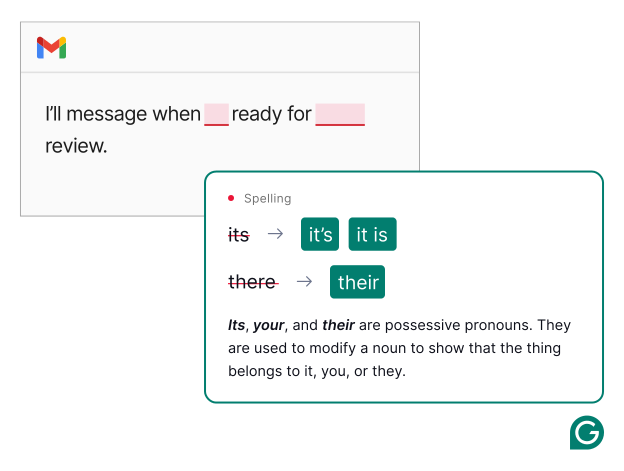
Refine grammar and clarity in both Spanish and English
Fix typos, grammatical mistakes, and misplaced punctuation in just a few clicks.
Make it engaging
Turn AI-generated text into prose that sounds like a person wrote it.
Humanizer executive voice product example
Grammarly's Paraphraser tool product example
Clarify your message
See alternative phrasing in both Spanish and English that keeps your voice and meaning intact.
Check for AI
See where your writing may sound AI-generated.
Grammarly's AI Detector tool product example
The only Spanish to English translator built for better writing
Get support that goes beyond translation when you sign up for Grammarly Pro.
Works wherever you write
Get instant Spanish to English translations across more than 1 million apps and websites.
Tone and meaning preserved
Get Spanish to English translations that keep the tone, emphasis, and intent of the original.
Trusted ecosystem
Translation works alongside Grammarly’s full suite of writing tools, from proofreading to AI detection.
Constantly improving
Our AI experts work continuously to provide the latest features and advancements in AI translation.
Multilingual support
Get translation and writing support in Spanish and English. Switch between languages as you write.
Translate between other popular languages
Pick your pair and start translating
Multilingual support wherever you write
Get high-quality, real-time writing support in the languages you write in and translate to. From grammar and tone suggestions to full paragraph rewrites, Grammarly is your clear, compelling writing in more than 20 languages.
Learn more
Learn more

See why people love Grammarly
“I am blown away by Grammarly’s translation feature. This is something my organization has been needing for a long time, and it will significantly improve our communication with non-native English-speaking employees and customers. Efficiency is crucial for us, and I am excited to introduce this tool to my team!”
Jenn Sayre
Grammarly Collective Ambassador
Who Grammarly’s Spanish to English translator is for
Grammarly can help you communicate confidently and clearly across languages. Here are some of the best ways to use Grammarly’s Spanish to English translator.

Students and researchers
Your work keeps the precision scholarly writing demands, whichever language you submit it in. Refine the translated draft before it goes out, so your text reads as finished work rather than converted work.

Busy professionals
Send in another language as fast as you send in your own. Translating and polishing happen in the same window, so a client email in English takes one pass instead of a round trip through three tools. Use Grammarly in Gmail, Outlook, and Slack, and the same support follows you into whatever you write next, without a copy-paste in either direction.

People who write in more than one language
Your voice survives the switch. Grammarly gives you real-time writing support in more than 20 languages, so the language you happen to be working in stops deciding how much help you get.

People learning a new language
You come away knowing more than when you started. Grammarly’s suggestions show what changed and why, which turns a translation into a short lesson you didn’t have to go looking for.
No copying, no pasting, no context switching
Grammarly’s translation feature works with over 1 million apps and websites, so you and your team can work across languages without leaving your current task.

Google Docs

Microsoft Word

Gmail

Microsoft Outlook

Slack

Salesforce

Microsoft PowerPoint

LinkedIn

Microsoft Teams

Figma

Zendesk

Jira
See why people prefer Grammarly

of students using Grammarly report that Grammarly is an essential tool for them to do well in school.
of Grammarly users report that Grammarly gives them the confidence to write in their own voice.

of Grammarly users report feeling empowered when writing with Grammarly.

of Grammarly users report that Grammarly helps them create more persuasive and convincing writing.
Privacy and security built in
Keeping your work secure is at the heart of everything we do. Our translation feature never retains your data. That’s why leading companies trust Grammarly with their work.
Learn more
Learn more

Frequently asked questions
Is Grammarly’s Spanish to English translator free?
Yes. Grammarly’s Spanish to English translator is free to use, no sign-up or account required. Sign up for Grammarly Pro to get translation anywhere you write and the full suite of Grammarly’s writing features.
Does Grammarly have a free Spanish to English translator?
Yes. Grammarly has a free translator built into grammarly.com. When you sign up for Grammarly Pro, you get translation anywhere you write and the full suite of Grammarly’s writing features.
Grammarly vs. Google Translate: what’s the difference?
The difference is what happens after the Spanish to English translation. Google Translate converts your text and stops there. Grammarly’s translator gives you the translation and then keeps working on it with you, so you can adjust grammar, clarity, and tone before the writing goes anywhere. With Grammarly Pro, that support follows you into Gmail, Word, and Slack instead of living on one page.
Is Grammarly a good DeepL alternative?
Grammarly is a strong DeepL alternative if you want translation and writing support in the same place. You get the translation, then get help adjusting grammar, clarity, tone, and register before you send. With Grammarly Pro, that works across more than 1 million apps and websites rather than on a single page.
Is Grammarly or Quillbot better for translating Spanish to English?
Grammarly, if you want translation that follows you beyond one page. Quillbot’s browser extension offers grammar checking and paraphrasing, but not translation. With Grammarly Pro, translation works inline across more than 1 million apps and websites instead of staying on a single page.
How do I translate Spanish to English text online for free with Grammarly?
Paste text into the translator at the top of the page, choose your source and target language, and click Translate.
How many languages does Grammarly translate?
Grammarly’s free translator supports 56 of the most common languages, including dialects. With Grammarly Pro, you get unlimited paragraph translation across 19 languages, plus real-time writing support in more than 20 languages wherever you write.
What languages can Grammarly’s free AI translator translate?
Grammarly’s free AI translator supports Afrikaans, Arabic, Assamese, Bengali, Bosnian, Bulgarian, Cebuano, Chinese, Croatian, Czech, Danish, Dutch, English (American), English (British), Finnish, French, German, Greek, Gujarati, Hebrew, Hindi, Hungarian, Indonesian, Italian, Japanese, Kannada, Korean, Malay, Malayalam, Marathi, Nepali, Norwegian, Odia, Persian (Farsi), Polish, Portuguese, Portuguese (Brazil), Punjabi, Romanian, Russian, Sanskrit, Serbian, Slovak, Slovenian, Spanish, Spanish (Argentina), Spanish (Mexico), Swedish, Tagalog, Tamil, Telugu, Thai, Turkish, Ukrainian, Urdu, and Vietnamese.
How do I translate Spanish to English without using the tone of the original?
If tone is important, use Grammarly’s translator. Grammarly’s advanced AI models are trained to read the meaning behind your writing, so the translation carries the intent and impact you want.
Can I translate my writing from Spanish to English and improve the quality?
Yes. With Grammarly Pro, you get access to a suite of writing tools that work alongside translation to offer suggestions to improve grammar, clarity, tone, and more.
What is the most accurate online translator?
No online translator is the most accurate for every language pair. Accuracy quality depends on subject, context, and type of writing. A translation can be technically correct and still have the wrong tone for whoever’s reading it. Grammarly translates your text and then helps you check both, so the version you send reads the way you meant it.
What is the best Spanish to English translator?
The best translator depends on your needs. Grammarly’s Spanish to English translator is part of a full suite of writing tools that show up wherever you’re writing. If you need instant translation and writing support, then Grammarly’s translator is likely the best for you.
Translate Spanish to English. Then make it sound great.
Join over 40 million people who write better with Grammarly.