Every year, the Superhuman team—encompassing team members making products Go, Grammarly, Coda, and Mail—comes together to connect and build during our in-person hackathons. In 2025, we took things to the next level by flying 491 team members from our global hubs across engineering, product, design, and marketing teams to our San Francisco hub for the first time since becoming Superhuman.
The energy was incredible: 278 teams hacked for over two days to bring their ideas for new Superhuman product experiences to life. We also put AI front and center, providing employees with resources on how to best use popular tools like Claude Code, Cursor, and Databricks. On the third and final day, 113 teams presented their demos to a panel of judges and their teammates, with five projects ultimately taking home top honors.
We’ll highlight some of these hackathon projects, the challenges teams overcame to create a demo in two days, and what’s next for them. Keep in mind that while these ideas are exciting, they’re experimental concepts for internal inspiration, not available product offerings (at least, not yet!).
Superhuman Command Everywhere
One of Superhuman Mail’s core strengths is its Command Center, which lets users quickly find, organize, and act on emails by using keyboard shortcuts. The six-person team behind Superhuman Command Everywhere (SCE) expanded this by letting users use the same Command Center shortcut to access all of Superhuman Mail and Grammarly’s features in their browser. Users would be able to access a wide variety of tools, including core functionality such as setting reminders or snoozing Grammarly, as well as activating AI agents like Reader Reactions.
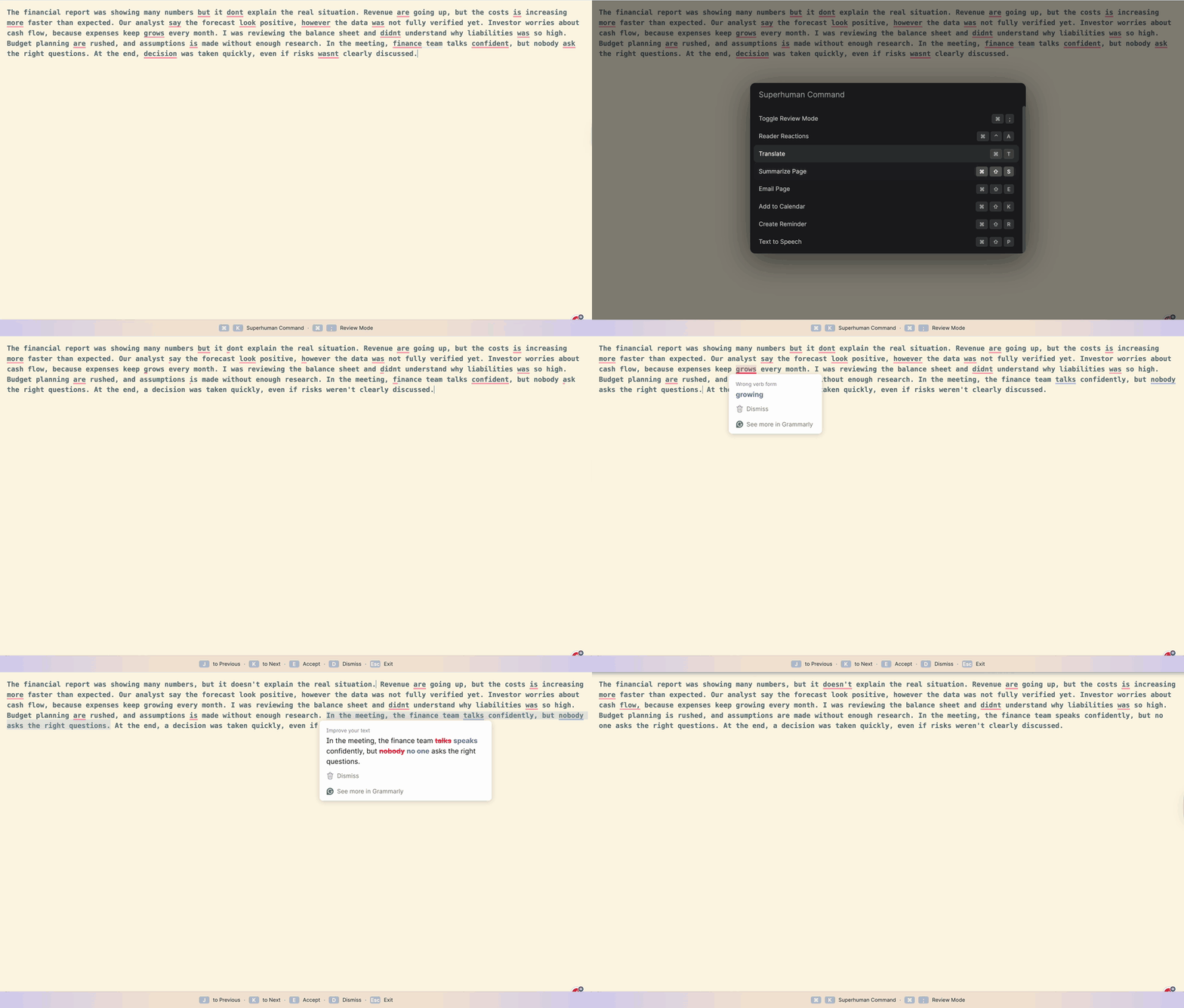 A snapshot of SCE in action
Beyond individual actions, SCE enables users to complete entire workflows without reaching for their mouse. For instance, users can use SCE to launch Grammarly’s Proofreader agent and work through feedback entirely from the keyboard by typing “J” and “K” to move between cards, “E” to accept suggestions, and “D” to dismiss them.
“Since users primarily engage with Grammarly while typing, it’s often more intuitive for them to rely on the keyboard to review and correct their writing,” explained Mangat Rai Modi, a software engineer who worked on this hackathon project.
The team built the integration in just a few hours, leaning heavily on AI tools to get up to speed. “No one on the team was used to the code base, and I am particularly not well-versed in frontend development,” Mangat shared. “We used AI to quickly understand the codebase and vibe-coded our way to the MVP. Otherwise, it would have been impossible to deliver a working feature in two working days.”
Looking ahead, the team sees their work pushing for a new design pattern for interacting with AI agents. “A keyboard-based user experience has the potential to reshape the mindset of both designers and users,” Mangat explained. “Looking ahead, we can use this paradigm to design our AI agents to be equally keyboard-friendly, which can help users be more productive.”
Whiteboarding in Coda
Coda has helped thousands of teams collaborate effectively, but Lead Customer Success Manager Thomas Baucom kept hearing requests for an easy way to whiteboard in Coda for brainstorming and diagramming. When the hackathon came around, Thomas decided to tackle this gap by using Claude Code and Cursor to build and launch a whiteboarding prototype.
With this feature, any Coda user could create a new whiteboard within a Coda document. From there, they could draw freely, add shapes, import images, or remove and redo elements as needed. One standout feature is AI diagramming: users describe the diagram they want in plain text, and the whiteboard generates an editable version that can be further tweaked.
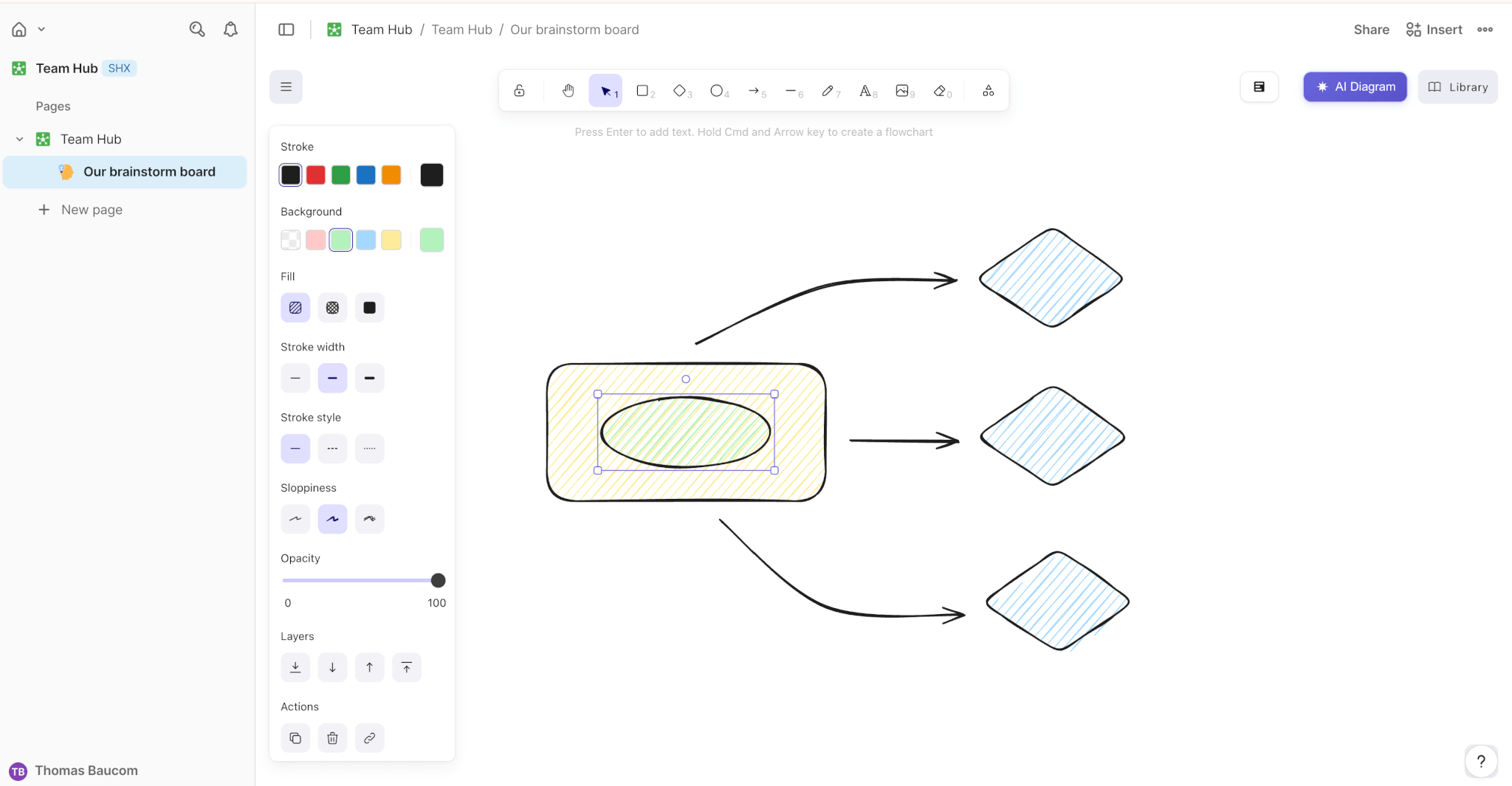 Screenshot of the Coda Whiteboard experience
As a solo team, Thomas leaned heavily on Claude Code, which allowed him to ship quickly. But having powerful coding assistance created a new challenge: knowing when to stop building and start cleaning.
“With modern AI tools, it’s incredibly easy to add one more interaction or polish pass,” Thomas explained. “But whiteboarding is a space with strong user expectations, which means the product needed to look and feel right, not just technically work.” That’s why Thomas prioritized UX refinement over feature expansion: tightening interactions, handling edge cases, and ensuring the core experience felt smooth and intuitive.
Thomas’s journey to building has been years in the making. “I started with no coding background and learned largely by sitting next to incredibly talented engineers, product managers, and designers, absorbing how they think and measure quality,” Thomas shared. This osmotic learning, combined with hands-on experience through Coda Packs, gradually raised his technical skills and confidence—leading him to embrace his maker identity. “I’m genuinely proud to work at a company that values rituals like hackathons and doesn’t gatekeep building behind job titles.”
Superhuman Listening
Product teams draw from a lot of valuable customer feedback and data, but the data is inherently messy. Insights aren’t structured and are scattered across different tools, making it harder for product teams to understand and build what users want.
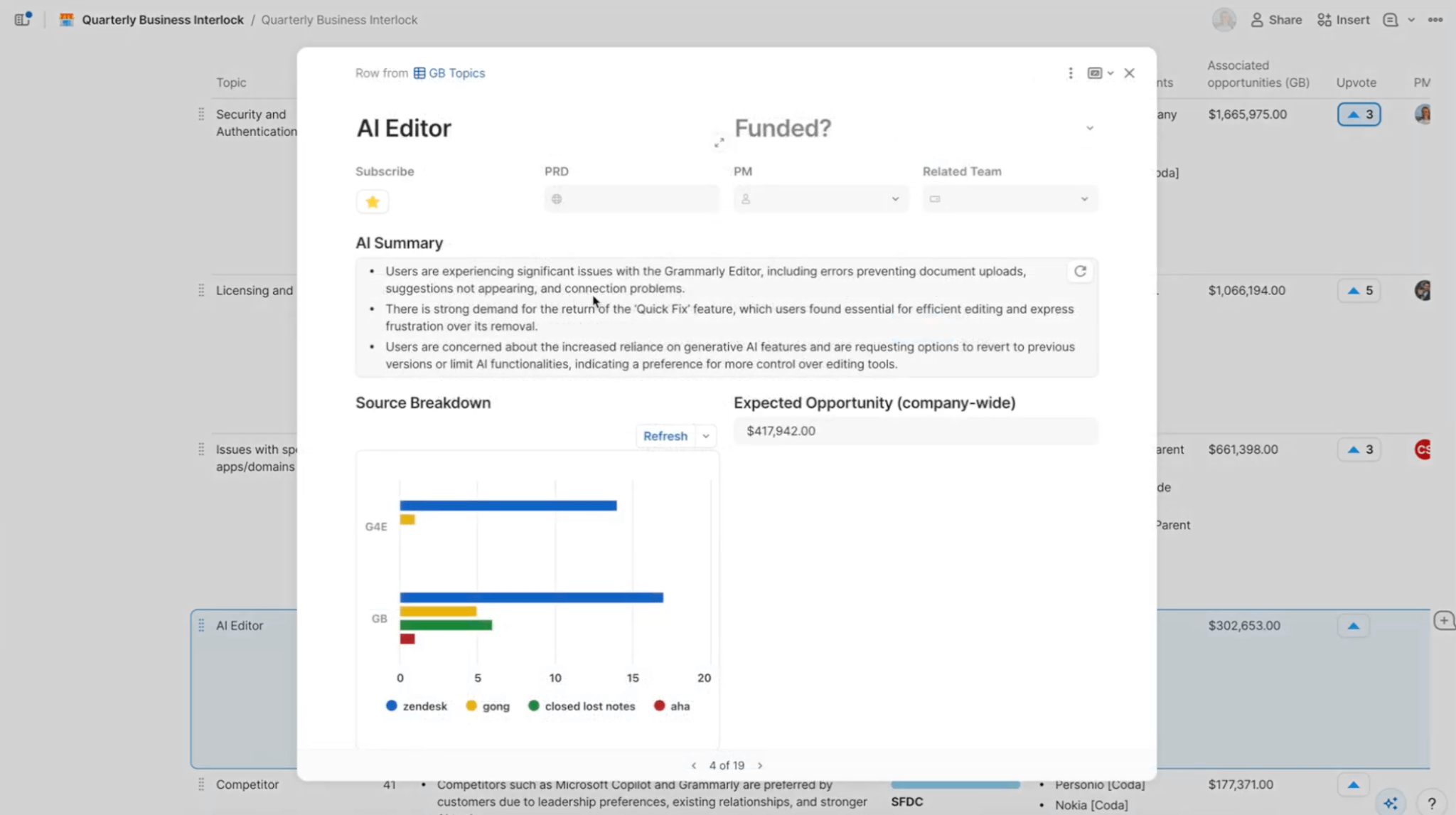 A sample output of a summary of how Superhuman Listening can summarize data across various sources to inform the product roadmap
Superhuman Listening would solve this problem by centralizing fragmented customer feedback data into a single source of truth that could be easily queried. For example, if a user had their product roadmap in Coda, they could import key insights from messy, unstructured data across various customer feedback tools (such as Gong or Salesforce), demonstrating the impact of individual features in a more efficient, streamlined manner. The Superhuman Listening hackathon team used this foundation to build an agent that helps cross-functional partners (such as sales engineers) quickly determine whether customer feedback is reflected in the product roadmap, making it easier to keep customers informed.
The project was built by a cross-functional team of 13 individuals from sales, data science, engineering, product management, and user research.
“Originally, we were two teams, but we merged mid-hackathon when we realized that we could merge our two ideas into one and build something more valuable together,” data scientist Stephen Kaiser explained. “It turned out great. We worked in Slack and met a few times to stay aligned and discuss some of the gnarlier challenges. It really helped that the entire team stepped up and was very proactive about contributing.”
That collaboration was essential, especially given the data’s complexity and messiness. “We spent a lot of time in the hackathon just untangling the data,” Stephen reflected. “While we made real progress, we still haven’t fully cut through the noise. For instance, we used LLM API calls to extract urgency and sentiment from Zendesk customer support tickets, but realized too late that most tickets were just noise, not actual product feedback.”
This learning helped the team chart their next move. “Going forward, we want to focus on truly validating this modeling and ensuring we can capture and report the right signals consistently enough.”
Inclusive Language agent
Writing shapes how we connect at work, both with teammates and customers. But even with the best intentions, bias or non-inclusive phrasing can slip through, affecting interpersonal relationships, broader customer trust, employee engagement, and, ultimately, business outcomes. “We see how much small word choices shape culture, trust, and opportunity inside large organizations, which can unintentionally and quietly reinforce bias,” said linguist Jade Razzaghi. That insight led her and fellow linguist Katia Starenka to build the Inclusive Language agent. “We wanted to create an easy way for people to learn more inclusive language patterns without slowing them down or making them feel judged,” she added.
The agent can analyze a piece of text, identify issues with harmful or biased language, explain why it’s problematic by linking to authoritative online resources, and provide a clear, inclusive rewrite that preserves the original intent. Each flagged item is also assigned a severity level, so users can easily identify and address the most critical feedback first.
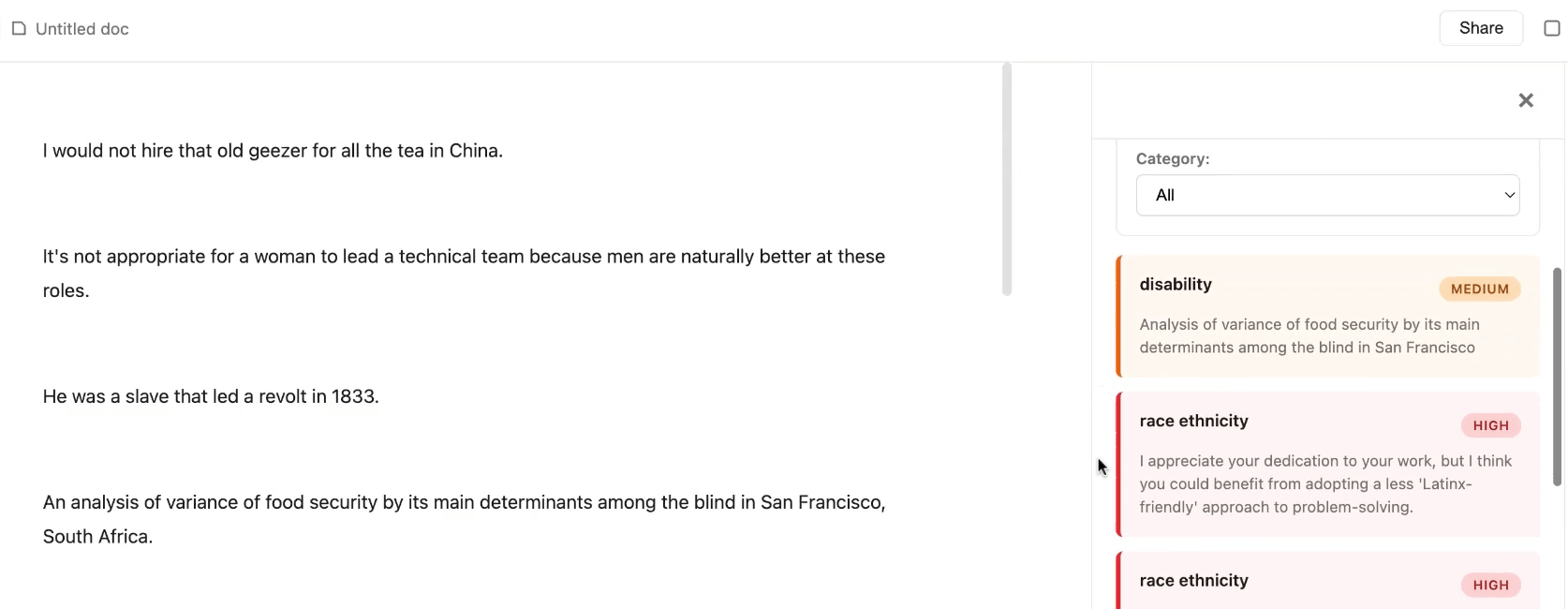 A screenshot of what the Inclusive Language agent interface looks like
One of the biggest challenges was delivering comprehensive results without overwhelming users. The team tackled this on two fronts: refining the results and improving the interface. For the results, they iterated on the prompt and added a few-shot example to improve accuracy. On the design side, they added a side panel that summarizes total issues, which users can filter by category and severity. Users can then drill down to a specific issue to see detailed feedback and suggested rewrites.
Looking ahead, the team is excited by the tool’s potential to drive greater inclusivity across enterprise organizations. “Many companies have DEI guidelines, but there’s a real gap between those principles on paper and what people actually type when they’re moving quickly to get work done,” Jade explained. “We see real potential for the Inclusive Language agent to help organizations solve this problem without adding friction.”
Build with us
Although these projects are hypothetical, our annual hackathon never fails to leave us feeling more inspired and excited about working at Superhuman. In the words of CEO Shishir Mehrotra, “Hackathons are one of the best ways to bring teams closer and give people space to get creative.”
If you’re excited about building innovative new things for Superhuman, or if you have a cool idea for the next Superhuman Hackathon, apply to join our team! View our open roles here.